Posts

Showing posts with the label powershell

Getting Company Portal apps locally using PowerShell (no auth!)
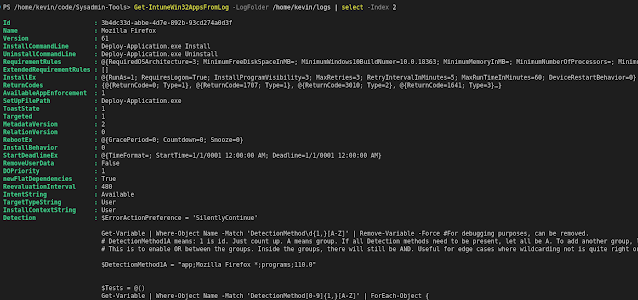
Image
As you may know, I work at Intility in the application packaging space.  I've been doing that since about 2015, and during that time I and my collegaues have developed standards and systems to help us package apps better and faster. The so far last and unifying system is AppPackBot, which you can read more about at Intility Engineering . I won't (and quite frankly can't) go into all the nuts and bolts beyond what that blog post says, but I wanted to share something. You see, there are mainly two "app stores" in a corporate Windows environment. Good old Software Center, and the new Company Portal. Software Center can be programmatically interacted with using the CCM_Application WMI Class . But Company Portal, not so much.  I burst out laughing when I read this attempt to install an app from Company Portal using PowerShell. Tldr: Using the companyportal: protocol to open Company Portal with a given app guid, and then sending a ctrl+i keystroke that equals clicking ...
Converting nested hashtables(or yaml) to nested psobject with PowerShell

Image
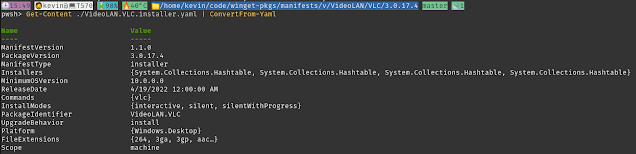
I'm dabbling with WinGet at work, and I wanted to parse the installer information about VLC Media Player provided by WinGet .  PowerShell does not natively support Yaml, so I like to use the powershell-yaml module. I thought a simple convert should be enough, but no. This just resulted in a hashtable, I wanted a psobject. So how about casting ut to a psobject? Better, at first I thought I was done. But hold on, the properties of Installers are still hashtables. Googling and thinking led me to almost use a recursive function that dealt with this, but then I remembered playing around with conversions between yaml and json. Side note, the UI config of Home Assistant may be edited as yaml, but is stored as json on disk. So I knew they are just different flavors of the same thing, really.  Anyways, this is how to convert yaml to nested psobects: Get-Content <file.yaml> | ConvertFrom-Yaml | ConvertTo-Json | ConvertFrom-Json (I added -Depth 5 just because the default value 2 i...

Sorting properties (not objects) in PowerShell

Image
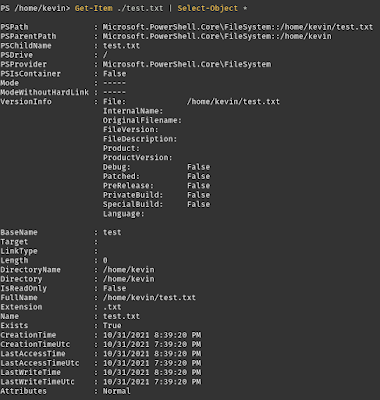
This week I had a need for sorting the properties of an object alphabetically. Funny enough, the aptly named "Sort-Object" does not do this, that cmdlet sorts an array of objects by one or more given property names – useful for listing files in a folder, ordered by the files' size, for example. But I had to figure out something else. Take this example, just all the properties of a file in default order. Say I want to sort these alphabetically. First, I need to identify exactly which properties. Get-Member gives you the methods in addition to the properties, I don't want the methods. I just want the different properties, I got those with -MemberType *Property. I want the properties sorted by Name, and then expand the Name. Now, store that in a variable, here named $SortedProps. This variable is now a string array. Now, back to start with the Get-Item of the file. That output gets piped to Select-Object, which has the parameter "Property" that takes a string a...

Automated Grocery Shopping

Image
I want to share a project I worked on a while ago, that I still use from time to time.  Basically all my grocery shopping is done at Kolonial.no, which is a Norwegian online grocery store that has an api for the shopping cart and products.  I am a cheapskate in many fields, including grocery shopping. And how I shop is somewhat robotic, very predictable and some might say boring and uninspired. But the thought process when I select items, can easily be automated, so I did. The code is on my github .  All the docs are there, so I won't bore you with that here.  But the idea and process is quite simple: I need eggs. Eggs are not a product. Eggs are a category of products . So my shopping list in this code is the category ID of eggs at kolonial.no.  On the same line in my shopping list I can also specify words that should or should not appear in the product name. For example "frittgående" should be in the name. (Norwegian for "free range") Next filter is whether or...